
Duplicating a test drive
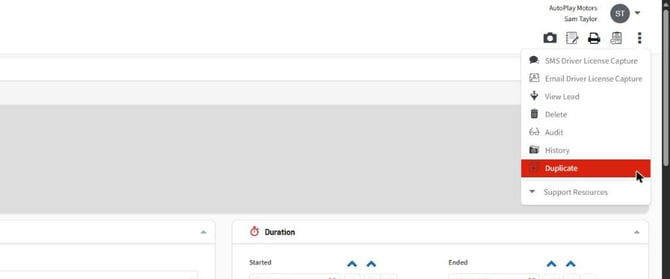
Open the existing test drive, loan vehicle or employee loan. Select the 3-dot menu and choose Duplicate (Screenshot 1).
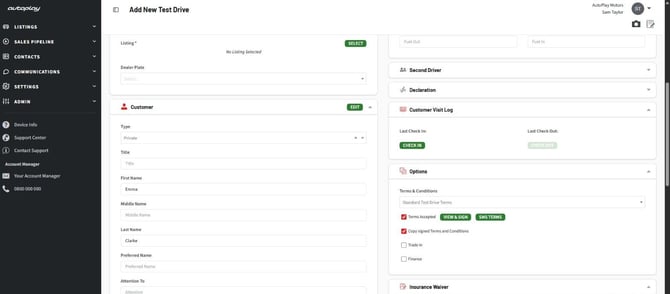
A new form opens with the customer's details filled in (Screenshot 2). Select the next vehicle, check the start and stop times, then select Save. Nothing is created until you save, so leaving the form without saving leaves no record behind.
The duplicate stays the same type as the original. A test drive on a lead is duplicated onto the same lead, and a standalone test drive stays standalone.
What carries across
Everything carries across except what belongs to the first drive. The duplicate includes the customer details, second driver, salesperson, form, source, yard, dealer plate, trade-in and finance details, declarations, licence photos, test drive notes, privacy acceptance and insurance waiver.
These start fresh, as on any new test drive:
- vehicle
- start and stop times, which default to now and 30 minutes from now
- completed and outcome
- odometer and fuel readings
- check out and check in photos and notes
- sanitisation sign-off
Signed Terms and Conditions
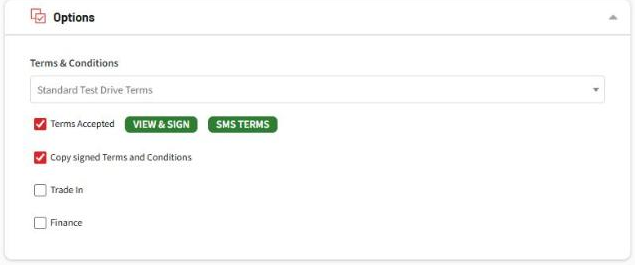
If the original test drive has signed Terms and Conditions, a Copy signed Terms and Conditions checkbox appears beside Terms Accepted in the Options panel (Screenshot 3). It's ticked by default.
- Leave it ticked and the customer and salesperson signatures, and the signed PDF, are copied to the new test drive when you save. Nobody has to sign again.
- Untick it to have the customer sign again, using View & Sign or SMS Terms as usual.
The signatures only copy if the new vehicle uses the same Terms and Conditions document as the first one. If it uses a different document, the checkbox clears itself when you pick the vehicle and the customer needs to sign the new terms.
Good to know
- The duplicate is a separate test drive. Changing or deleting it doesn't affect the original.
- Duplicate doesn't appear in the Test Drive Wizard or in Kiosk mode.
- SMS and Email Driver License Capture appear once the duplicate has been saved.
- You'll only see Duplicate if you can add a new record of that type.