
Employee loans can now be signed out through a stepped wizard. It's a shorter flow than the Loan Vehicle Wizard because there's no customer involved: four steps rather than seven.
The existing Employee Loan form is unchanged and stays available. You can use either.
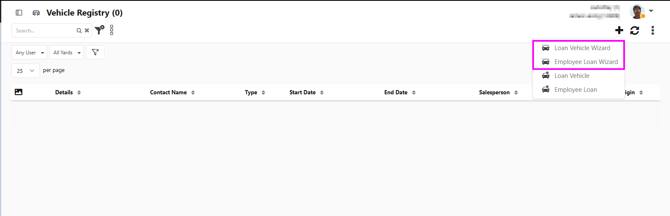
Where to find itVehicle Registry, the plus button in the action header, then Employee Loan Wizard.
The legacy Employee Loan item sits below it in the same menu and still opens the old form.
1. Employee
Pick the employee from the Sales Person dropdown. This lists staff who hold the Loan Vehicle role, which is a different list to the one on the Test Drive Wizard.
When you select someone, their licence details load from their user record: Driver Licence Number, Licence Version, Licence Expires and Date Of Birth. Driver Licence Number is required. The rest are optional.
All four fields can be edited, and any change you make is written back to that employee's user record when you save. If an employee has no licence on file, whatever you enter here becomes their stored licence detail. Licence photos are optional and don't block you from continuing.
[Screenshot — Employee step with licence details populated]
2. Confirm Vehicle
- Listing — optional, use Select to pick from the listing picker
- Vehicle Details — required, free text
- Employee Loan Form — required
There's no dealer plate or salesperson field on this step. The employee was already set on step 1.
3. Start Date and Time
Started is required. Odometer Out, Fuel Out and sign-out condition photos are optional.
4. Acceptance
Terms and conditions default to the Loan Vehicle terms. Tick Terms Accepted, then use View and Sign to capture a signature, or SMS Terms to send them to the employee for remote signing.
SMS Terms sends to the mobile number on the employee's user record. If there isn't one, no message is sent and you'll be told why. Add a mobile number to their user record and try again.
No customer or lead is createdEmployee loans don't create a contact record or a lead at any point.
Single loan ruleIf your dealership has the single employee loan setting turned on, an employee with a loan vehicle already signed out can't be given another. Saving will show a warning telling you the existing loan must be marked completed first. Everything you've entered is kept, so you can go back and change the employee rather than starting over.
Where the setting is off, an employee can hold more than one open loan.
After savingThe record opens on the existing Employee Loan edit screen, and appears in the Vehicle Registry grid with Employee in the Type column.
Check In, Odometer In, Fuel In, Completed, Auto Complete and Status are all handled from that edit screen.