
You can add wholesale quotes to an Appraisal Form to compare offers before agreeing a trade-in.
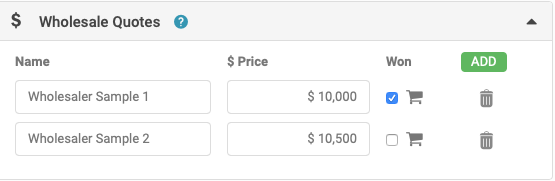
- Click the green Add button to add a quote, entering the wholesaler's name and their offer in dollars. Delete a quote using the rubbish bin icon next to it. Once a quote is added, you can flag it as WON.
- Click the trolley icon on a quote to automatically update the Trade In Offer field with that quote's value.
- Where multiple wholesale quotes exist, only one can be flagged as WON.
- The tooltip reads: "Check the 'WON' box if you accept their quote, and the trolley icon if you wish to use this quote as your starting 'Trade In Offer $'."
Capturing quotes by SMS
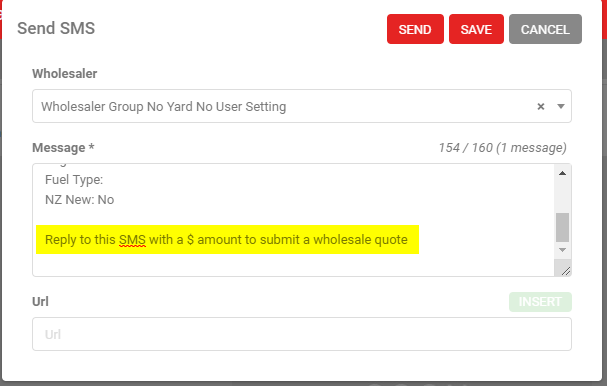
If you send an SMS to an individual wholesaler or a wholesale group, AutoPlayAuto.com can capture their reply automatically. A notification appears in the Notifications section when a reply arrives. If the wholesaler includes a dollar value with the $ symbol, it's captured straight into the Wholesale Quotes section. The SMS automatically includes the instruction "Reply to this SMS with a $ amount to submit a wholesale quote".
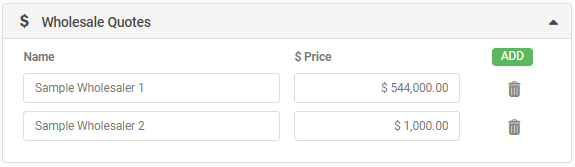
The wholesaler's reply quote is captured to the Wholesale Quotes section on the Appraisal Form:
- Sent to a group, reply without a dollar amount: not added.
- Sent to an individual with a dollar amount: added to the quote section.
- Sent to a manually entered number with a dollar amount: added to the quote section.
Sending wholesale quotes via SMS Gateway works automatically if you already send lead SMS through the gateway. If you don't, contact AutoPlay Support to set it up (additional per-SMS charges apply).