
Loan vehicles can now be signed out through a stepped wizard instead of a single long form. It follows the same flow as the Test Drive Wizard, so if you already use that, this will be familiar.
The existing Loan Vehicle form is unchanged and stays available. You can use either.
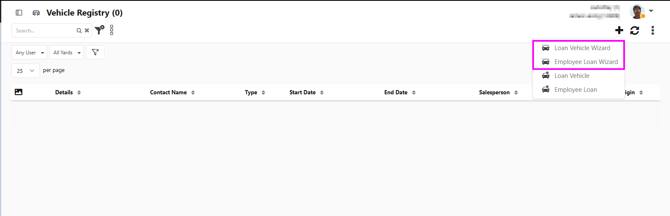
Where to find itTwo entry points:
- Vehicle Registry, the plus button in the action header, then Loan Vehicle Wizard
- The sidebar entry, alongside Test Drive Wizard
The legacy Loan Vehicle item sits below the wizard in the plus menu and still opens the old form.
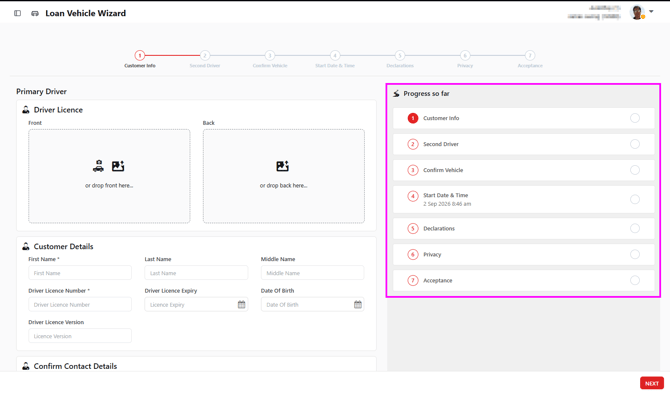
Customer Info — driver licence images, name, licence details, date of birth, and contact details. Address fields (street, suburb, city, postcode) are now captured here. Where your dealership has any of these set as mandatory, you'll need to complete them before moving on.
Second Driver — optional, skip it if there isn't one.
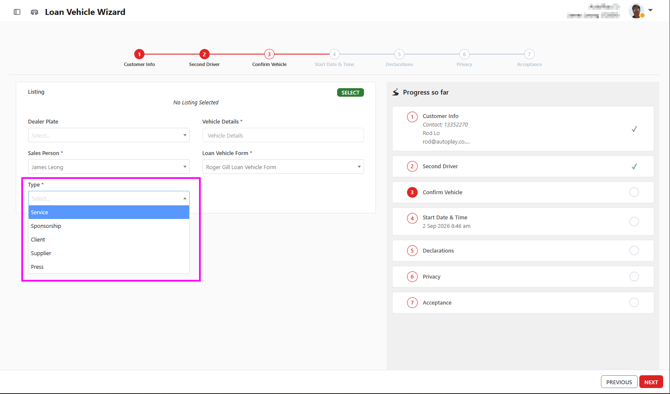
Confirm Vehicle — listing, dealer plate, vehicle details, salesperson, and the Loan Vehicle Form. This step also carries the new Type dropdown.
Start Date and Time — start date, odometer out, fuel out, and sign-out condition photos.
Declarations — only appears where your dealership or yard has declarations configured. Skippable.
Privacy — signature capture, including remote signing by SMS.
Acceptance — terms and conditions, terms accepted, view and sign, and SMS terms.
Type is required on every loan. Pick the reason the vehicle is going out: Service, Sponsorship, Client, Supplier or Press. You can't move past Confirm Vehicle or save the record without setting it.
This is what fills the Type column on the Vehicle Registry grid, so it's worth getting right.
A loan saved through the wizard does not create a lead. You won't be prompted to create one for a new contact, and you won't be asked to pick one for an existing contact. The contact is still saved as normal.
What stays on the edit screenThe wizard covers creating the record. Notes, Check In, Odometer In, Fuel In, Completed, Auto Complete and Status are all handled on the edit screen once the loan is saved.
A saved record opens as Edit Loan Vehicle, the same screen you'd reach from the legacy form.