
You can now decide, on each Prospect Action, what Lead Source and Lead Campaign a prospect gets when it converts to a lead. You can also lock those values so they can't be changed afterwards.
The problem this solves: converted prospects all landed on the generic Prospecting source, and anyone could edit it. There was no way to tell a lead worked by a dedicated prospector from one created by a salesperson.
Setting it upOpen Edit Prospect Action. The Lead Conversion panel sits on the right-hand side.
Set any of:
- Lead Source
- Lead Campaign
- Lead Sub Campaign (shown where sub campaigns are available for the selected campaign)
- Lead Labels
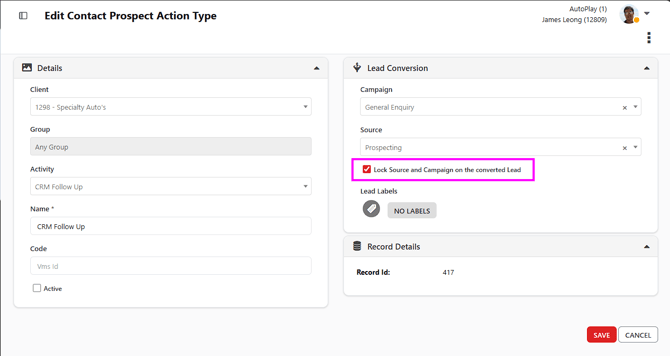
When a prospect with a matching Prospect Action converts, the new lead is created carrying these values.
Locking the valuesOnce a Lead Source and Lead Campaign are set, a checkbox becomes available to lock them. It's off by default.
Off — the values are prefilled on the converted lead and can still be edited on Lead Detail, as they are today.
On — Lead Source, Lead Campaign and Lead Sub Campaign are read only on the converted lead and can't be changed manually.
Lead Sub Campaign locks with the Campaign, since it's a child of it. Lead Labels stay editable either way, so the sales team can keep tagging leads through their lifecycle.
When the lock is appliedThe lock and the values are stamped onto the lead at the moment of conversion. The lead doesn't check back with the Prospect Action afterwards.
That means:
- Turning the checkbox on later affects new conversions only. Leads already converted stay editable.
- Turning it off later affects new conversions only. Leads already converted stay locked.
- Deleting the Prospect Action doesn't change leads that have already converted. They keep their values and their read only state.
The Lead Manager Admin role can edit Lead Source, Lead Campaign and Lead Sub Campaign on a locked lead. Nobody else can. This is the recovery path if a prospect converts under the wrong Prospect Action.
What the lock doesn't blockThe lock applies to manual editing in the interface only.
- API and other automated integrations can still write to Lead Source and Lead Campaign on a locked lead.
- Deleting a Lead Source prompts you to pick a replacement and moves every affected lead onto it, including locked ones. A locked lead never ends up with an empty Source.
- Deleting a Lead Campaign doesn't alter existing leads.
The dealer setting Do Not Allow Source Modification on Prospect Conversion already makes Lead Source read only on converted leads. That setting still applies. Where it's on and the new per-action checkbox is off, Lead Source stays read only.
The new checkbox only adds to it: per-action control, and coverage of Lead Campaign and Lead Sub Campaign, which the dealer setting doesn't touch.
Before you turn the lock onMost Prospect Actions currently default their Lead Source to Prospecting and few have a Lead Campaign set. Locking without changing that just freezes the generic value, and you'll be no better off for attribution.
Set a distinct Source or Campaign on the action first, then turn the lock on.