
This article shows you how to view and update your own user details in AutoPlay.
There are two ways to edit your own details:
- Via the My Users screen.
- Via the My Details screen.
Reach My Details from the left hand navigation menu via Settings > Company Settings > My Details, or from the user profile menu at the top right of the screen, shown below. Every user can access their own My Details screen and update their personal details, regardless of what roles are set up against their account.
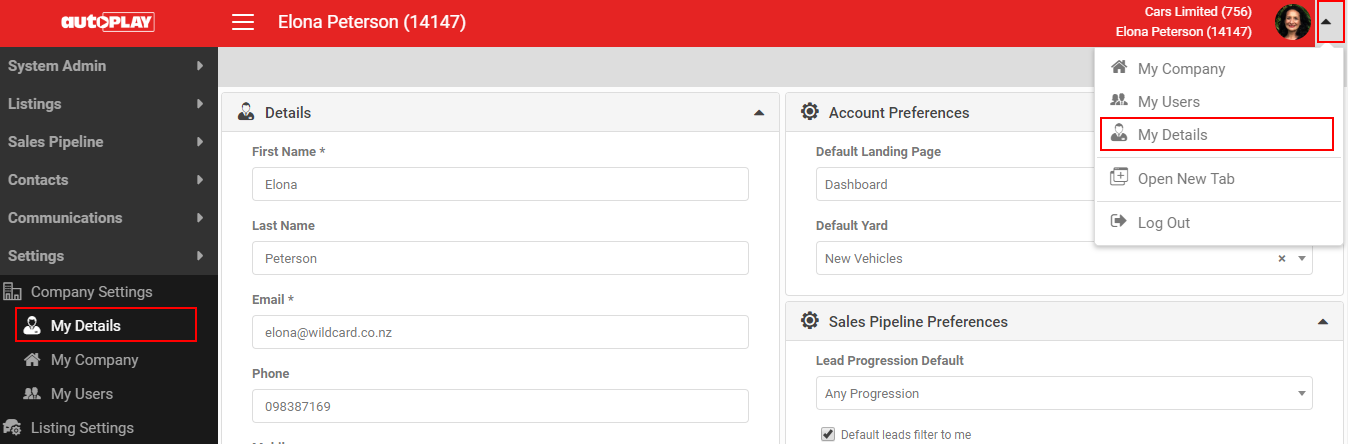
The My Details screen works exactly like navigating to a user record via My Users, except it is always locked to your own logged-in details. It has the same sections: Details, Roles, Account Preferences, Sales Pipeline Preferences, Email Preferences and Notes. For a full walkthrough of each section, see How To Add A New User In AutoPlay.