
What changes in Analytics Reporting
Any prospect closed with a Not For Reporting outcome is left out of Analytics Reporting, across all of your history. This covers:
- the Prospect Outcome chart
- the Prospect and CRM Follow Ups chart and table
- the prospect figures on Lead Conversion, Lead Summary and Market Insight Conversion
- prospect activity on Lead Communication
- the Closed to Prospect table, chart and KPI
A lead only counts as Closed to Prospect when it has at least one prospect that isn't flagged.
Nothing is deleted. If a flag is removed, those prospects come back on the next refresh.
Loaded in Error is flagged for everyone
Loaded in Error is flagged Not For Reporting from this release, for every dealership. Your historical prospect numbers will drop by however many prospects you closed as Loaded in Error. This is expected and doesn't mean data has been lost.
Filtering by prospect outcome
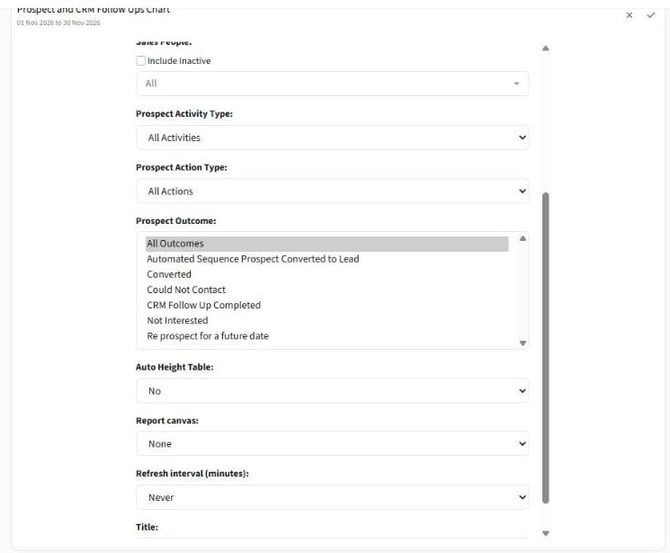
The Prospect Outcome chart and the Prospect and CRM Follow Ups chart and table have a new Prospect Outcome filter (Screenshot 1). It defaults to All and lists every outcome that isn't flagged.
If you saved a dashboard filtered to an outcome that's later flagged, that widget shows as empty.
Outcomes for your own dealership
Outcomes can now belong to a single dealership or dealer group, as well as the standard set every dealership sees. AutoPlay maintains the outcome list. Contact support if you need an outcome added for your dealership or group, or want one flagged Not For Reporting.
Some outcomes are set by the system and can't be chosen by hand, for example Automated Sequence Prospect Converted to Lead. They still count in reporting.
Exports
This change applies to Analytics Reporting only. Scheduled and manual report exports still include prospects with a Not For Reporting outcome, so an export and a widget can show different prospect numbers.