
Wishlists captured against a lead now have their own screen. Previously they only surfaced inside the general lead list, mixed in with everything else. The Wishlist Dashboard gives you a single view of every wishlist record on your account, with search and filters.
Where to find itSales Pipeline > Wishlist Dashboard, alongside the Lead Dashboard.
What's on the screenThe results table shows one row per wishlist record:
| Column | Shows |
|---|---|
| Lead | The lead the wishlist was captured against |
| Contact | The lead's contact |
| Vehicle Type | The vehicle type on the wishlist |
| Criteria Summary | A condensed view of make, model, variant, price range, year range and any specification fields that apply to that vehicle type |
| Created | The date the wishlist form was created |
Rows are sorted by Created date, newest first.
The Criteria Summary only shows fields relevant to the vehicle type. A boat wishlist shows propulsion, construction type and engine HP. A car wishlist shows transmission, drive, CC and seats. Fields that don't apply to the record are left out rather than shown blank.
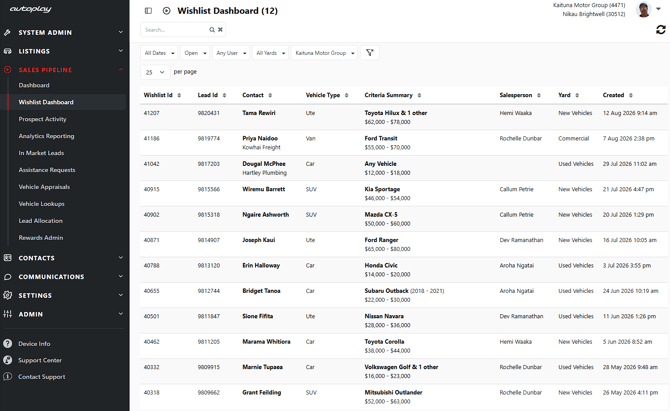
Search is free text and matches contact name, make, model and variant.
The filter bar carries the same filters you already use on the Lead Dashboard:
- Yard
- Salesperson
- Dealer Group
- Open or Closed lead status
Plus filters specific to wishlists:
- Wishlist Form Created Date (date range)
- Vehicle Type
- Make
- Model
- Price range (from and to)
- Year range (from and to)
Search and filters work together rather than overriding each other. Filters stay applied while you're on the screen.
Opening a wishlistClick any row to open that wishlist form within Lead Detail, in the same tab.
What this screen doesn't doThe Wishlist Dashboard is read only. Wishlists are still created, edited and deleted from the Vehicle Wishlist form on Lead Detail, and the dashboard doesn't change that.
It also doesn't show inventory or appraisal match counts or match results. Match notifications are unchanged and continue to work as they do today.
The screen is desktop only.
AccessThe dashboard is gated by the Vehicle Wishlist & Email role on your account. Where the role is set up, everyone on the account can open the dashboard. Where it isn't, the screen and its navigation entry don't appear. Contact your administrator if you need access.
Your visibility of individual records follows the same rules as the Lead Dashboard, so you'll see the same set of leads on both screens.